Summary / TL;DR
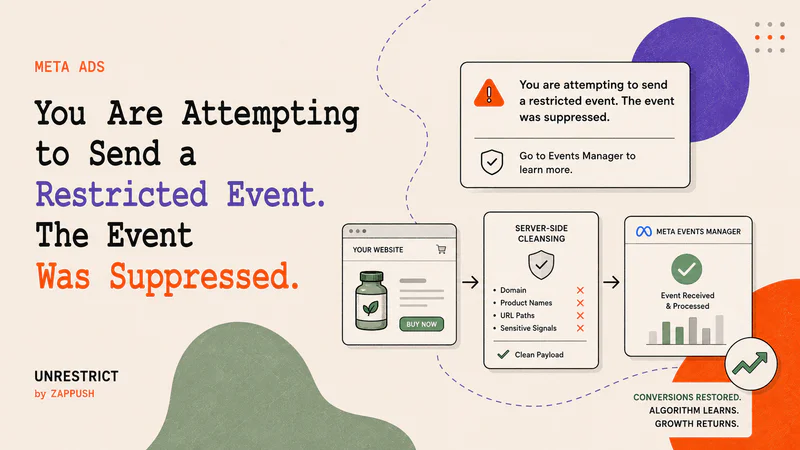
If you are seeing the message, "You are attempting to send a restricted event. The event was suppressed. Go to Events Manager to learn more.", The Meta has classified your domain under one of its 11 restricted data source categories and is rejecting conversion events that contain data it considers sensitive, such as domain name, product names, URL paths, or content categories that imply a health condition, a financial product, or a regulated substance.
Your ads keep running and spending budget while your events are suppressed. Meta does not pause campaigns when it blocks your conversion signal, so your algorithm stops learning from actual conversions without any visible warning in Ads Manager.
Zappush's health & wellness compliant infrastructure with server-side payload cleansing removes the specific signals inside your event data that triggered the suppression, restoring your conversion events without requiring Meta to reclassify your domain.
What Does This Error Mean?

If you are seeing "You are attempting to send a restricted event. The event was suppressed. Go to Events Manager to learn more."
It means Meta's automated system has determined that your website sells, markets, or provides resources for products or services that fall under one of Meta's restricted data source categories.
Meta currently enforces restrictions across 11 categories:conomic vulnerability — associated with individuals experiencing personal economic hardship that impacts housing, food security, or freedom
Financial service: provides financial tools, consultation, services, or consumer credit reports
Health & wellness - other: associated with general health and wellness topics (pharmacy services, optician services, health insurance, weight management products, GLP-1 supplements)
Health & wellness condition: associated with one or more medical conditions or health statuses (cancer, anxiety, arthritis, addiction, substance use disorders)
Health & wellness provider: provides or facilitates access to healthcare providers, products, or services (medical practices, hospitals, telemedicine, clinicians)
Nationality: associated with individuals of a specific citizenship status, immigration status, or refugee status
Personal hardship: associated with individuals likely facing personal hardship
Politics: associated with a specific political party, political position, or political issues
Race: associated with individuals of a specific race or ethnicity
Religion: associated with individuals with specific religious or spiritual beliefs and practices
Sexuality or gender identity: contains topics related to sexuality or sexual orientation, or caters to individuals of a specific gender identity
Trade union: associated with members of a trade union
When Meta classifies your domain under any of these categories, it applies data sharing restrictions to the events your Meta Pixel or Conversions API sends. Depending on the severity of the restriction, Meta will either strip specific parameters from your events, block standard conversion events like Purchase and Lead, or reject all event data from your domain entirely.
The classification applies to your domain, not to your ad creative or your ad account. These are separate systems inside Meta. Your ads can be approved and delivering clicks while your domain is simultaneously classified and your events are being blocked. This is why you may not notice the problem until your reported conversions stop matching your backend sales or your ROAS starts declining without an obvious cause.
Why Is Meta Blocking Your Events?
When someone buys a product from your website, your pixel sends a Purchase event to Meta. That event contains data: the product name, the URL the purchase happened on, the content category, and custom parameters you may have added.
If that product is called "Blood Sugar Support Formula" and the URL reads /products/blood-sugar-support-formula?category=diabetes-supplements, Meta can now infer that this specific person, identified by their email address, phone number, or IP address through advanced matching, likely has a blood sugar condition.
Under HIPAA, FTC regulations, and state privacy laws, that inference can constitute Protected Health Information. Meta is not HIPAA compliant and does not sign Business Associate Agreements. Receiving this data creates legal liability for Meta.
This is the same legal exposure that led to FTC settlements with BetterHelp ($7.8 million, 2023) and GoodRx ($1.5 million, 2023) for sharing health-related user data with advertising platforms. Multiple class action lawsuits have named Meta directly over health data collected through the Meta Pixel.
Meta suppresses your events to reduce its own legal exposure. The suppression is not a bug or an error in your tracking. It is Meta's automated compliance system doing exactly what it was designed to do.
The same logic applies across all 11 restricted categories. A financial services product implies someone's financial situation. An adult wellness product implies personal health information. A gambling-related event implies a user's gambling activity. In each case, the event data, combined with user identifiers, creates data that Meta does not want to receive.
How Does Meta Decide Which Events to Block?
Meta evaluates the full content of every event payload. This includes:
The event source URL. The full URL path the event was triggered from. A URL like yourstore.com/products/semaglutide-injection-kit?variant=10mg&category=weight-loss contains multiple signals that Meta's classifier reads as health-adjacent.
The product name. If your event payload includes a content_name parameter like "Testosterone Booster 90 Caps" or "CBD Sleep Gummies 30ct," Meta reads that as a signal that the person who triggered the event has a condition associated with that product.
The content category. A content_category parameter like "mens-health-supplements" or "weight-loss-medication" tells Meta what vertical your product belongs to.
Custom parameters. Any non-standard parameters you send with your events, such as appointment types, plan tiers, or condition names.
The event name. Standard event names like Purchase, Lead, and Schedule carry specific meaning. At Level 2 restrictions, these standard events are blocked regardless of what the rest of the payload contains.
Meta evaluates all of these together. A product name alone can trigger suppression. A URL path alone can trigger suppression. A combination of signals across multiple parameters can trigger suppression even when no single parameter looks restricted on its own.
This is why renaming your Purchase event to "event_01" does not fix the problem. If the payload still carries a product name like "Diabetes Management Kit," Meta suppresses the event regardless of what you called it. The event name is the least important variable. The payload is what Meta reads.
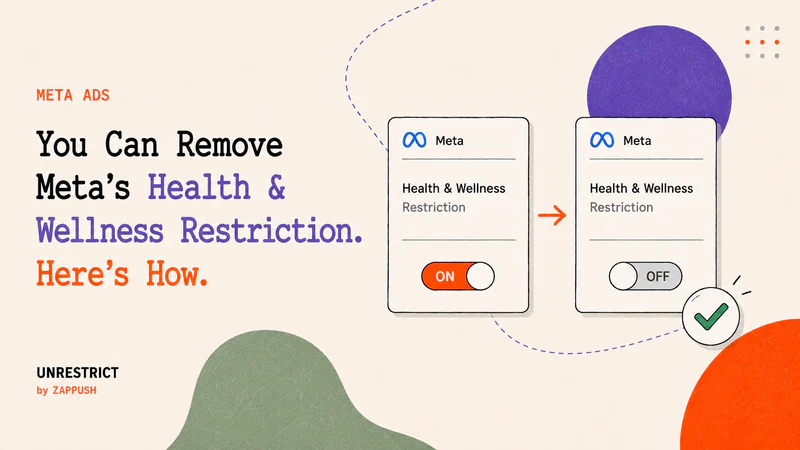
For before-and-after examples of what non-compliant and compliant event payloads look like, read:
How to Check If Your Domain Has Been Classified
Before trying any fix, confirm two things: whether Meta has classified your domain and, if so, at what severity.
Step 1: Check your classification.
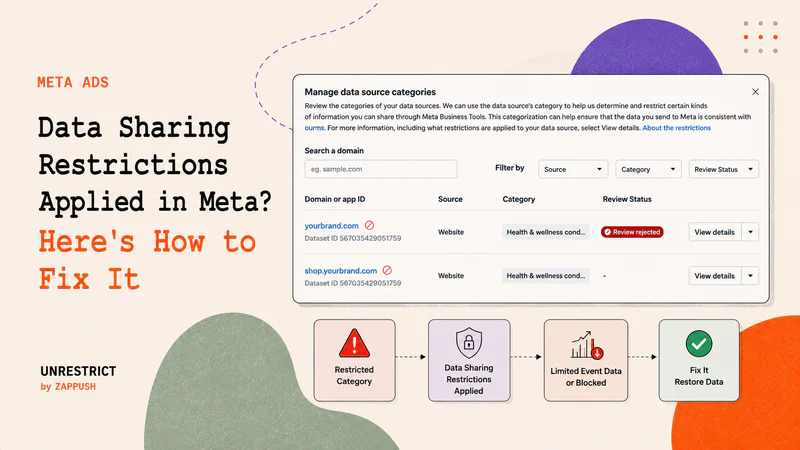
Go to Meta Events Manager. Select your Pixel or Data Source. Go to Settings. Scroll to Manage Data Source Categories.
If your domain has been classified, you will see a label next to it with one of the 11 restricted categories listed above, along with an icon indicating severity:
A yellow warning icon means Level 1 (Core Setup). Meta is stripping custom parameters and truncating your URLs at the domain level. Your standard events still fire, but the supporting data that makes them useful for optimization is degraded.
A red restricted icon means Level 2 (Standard Event Restrictions). Meta is blocking lower-funnel events like Purchase, Lead, AddToCart, and Schedule.
Near-zero event activity across the board, including PageView, likely means Level 3 (Full Domain Restriction). Meta is blocking all event sharing from your domain.
For a complete breakdown of what each level blocks, read:
Step 2: Check Diagnostics.
In Events Manager, go to the Diagnostics tab for your data source. Look for the notifications:
"Data sharing restrictions applied" means Meta has placed your data source into one of the restricted categories. Events may be blocked, and the custom parameters and URL paths are being stripped from every event.
According to Meta's official documentation, "Event parameters blocked" appears when parameters "may contain information that goes against the Meta Business Tools Terms." And "Your data is restricted" appears "when parameters repeatedly send data potentially against the Meta Business Tools Terms, placing your Meta Business Tool into a core setup."
These diagnostics and the "restricted event suppressed" message are related. Parameter blocking comes first. Core Setup is the escalation. Full event suppression follows. They tend to progress in that order.

Step 3: Check what Meta sees on your domain.
Meta's Events Manager tells you that a restriction exists. It does not tell you which specific signals on your website caused the classification.
Why the Common Fixes Do Not Work
Renaming events does not fix it. Meta evaluates the full payload content: product names, content categories, URL paths, and custom parameters. An event named "conv_a" carrying content_name: "Testosterone Booster 90 Caps" in the payload is suppressed the same way a Purchase event would be. Meta's own documentation on "Event parameters blocked" states that parameters are blocked because they "may contain information that goes against the Meta Business Tools Terms." The parameter content is what Meta evaluates, not the event name.
Switching to Conversions API alone does not fix it. The Conversions API is a delivery method. Meta's data sharing restrictions apply at the domain level. Events sent server-side from a restricted domain are filtered on receipt, identically to browser pixel events. Meta's documentation confirms this: "events sent server-side will be removed upon receipt if the data source is restricted." CAPI is the correct delivery infrastructure for the actual fix, but CAPI on its own, without changing what the payload contains, changes nothing.
Appealing the classification does not fix it if your domain genuinely sells restricted products. Meta provides a "request review" button in Events Manager under Manage Data Source Categories. The process is automated, does not accept supporting evidence, takes 3 to 7 days, and has a 30-day cooldown after rejection. Across the 75+ Meta ad accounts we reviewed spanning January 2025 through Q1 2026, and across every major practitioner community (Shopify Merchants, Stape forums, r/FacebookAds, Foxwell Founders), we found no documented case of a genuine health brand successfully reversing its classification through this process. If the classification is genuinely wrong (an ergonomic furniture brand flagged as medical equipment), the appeal is the right path. If your domain sells health products, the appeal re-scans the same domain with the same products and reaches the same conclusion.
Removing the pixel from restricted pages does not fix it. This stops new sensitive data from being sent to Meta, which is necessary and correct as an immediate step. But it does not reverse the existing domain classification. Meta classified your domain based on a crawl of your entire website content, not just the pages carrying the pixel. And removing the pixel without replacing it with a compliant server-side setup creates a gap in your conversion reporting.
What Fixes It
The suppression stops when Meta receives clean events. A clean event is an event whose payload no longer contains the signals that triggered the suppression, but still contains the conversion data Meta's algorithm needs: that a real user converted, at a specific time, with a specific value.
Your domain classification does not need to change. Your events need to arrive at Meta without restricted data inside them.
For Level 1 (Core Setup) and most Level 2 restrictions: Server-side payload cleansing on your existing domain. Your server sits between your website and Meta. Every event passes through it before reaching Meta. The server strips the signals that triggered the suppression: product names that imply a health condition, URL paths containing restricted terms, content categories with condition-adjacent language, and non-standard custom parameters. Meta receives a clean payload with the conversion value and currency intact.
This also restores the URL context and custom parameters that Core Setup strips automatically. Your server sends the event via CAPI with a clean but functional URL, instead of letting Meta truncate it at the domain.
For Level 3 (Full Domain Restriction) or disabled accounts: A clean intermediary domain is required in addition to payload cleansing. This is a separate root domain with no restriction history and no restricted content on its landing pages. Your ads point to this domain. Your server captures session data on the clean domain, passes the user to your real store, stitches the session across both domains using persistent identifiers (_fbp, _fbc, UTMs, click IDs), and sends a single cleansed event to Meta from the clean domain.
A subdomain of your existing domain does not work. Meta's restrictions apply at the root domain level. shop.yourbrand.com inherits the classification of yourbrand.com.
For domains where the domain name itself contains restricted terms (getslim.com, glp1clinic.com, semaglutidedirect.com): An intermediary domain is required regardless of restriction level. The restricted signal is in the domain string itself, which appears in every event URL you send to Meta. Payload cleansing cannot remove your own domain name from your own URLs.
In the accounts we have worked with that implemented this architecture correctly, Event Match Quality recovered from approximately 5/10 to 8.5-9/10 after the fix was applied.
For a full walkthrough of how this architecture works, including the three components (clean domain, session stitching, payload cleansing) and what the fix restores at each restriction level: Purchase Events Blocked on Meta? Here's How to Fix It
Unrestrict by Zappush helps brands in Health & Wellness, CBD & Hemp, GLP-1, Med Spa, Telehealth, Sexual Wellness, and other restricted categories restore their conversion events on Meta. We build the server-side infrastructure, intermediary domain, and payload cleansing end-to-end.