Summary / TL;DR
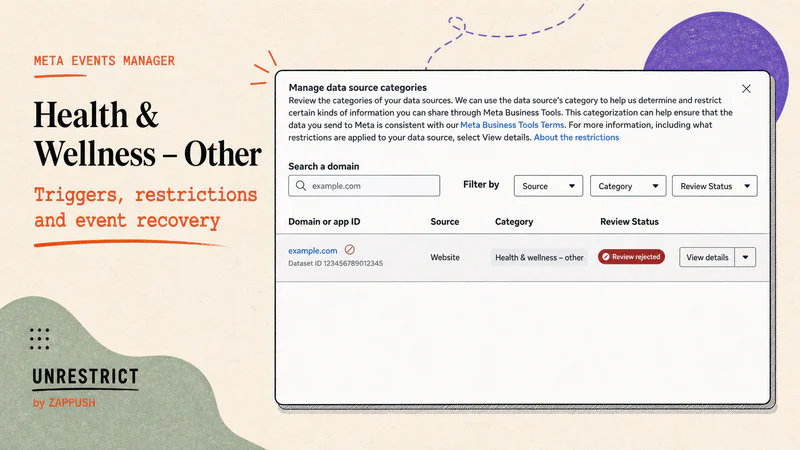
Health & wellness - other is a data source category in Events Manager. Meta uses it for websites that sell health and wellness products or services in general, not websites about a specific disease and not healthcare providers. The category label by itself does not tell you what is restricted. You need to check your live dataset.
Meta can restrict URL parameters, block specific conversion events like Purchase or Lead, or fully block all event sharing from your website. These restrictions can apply globally or to specific regions. Custom events get auto-blocked until you review them.
The fix is in your event payloads, not your ad copy. Look at what your Pixel and CAPI are sending to Meta, remove health-related details that do not belong in ad measurement data, test inside Events Manager, and verify that the events are received and usable.
If you see Health & wellness - other on your dataset in Events Manager, it means Meta infers your website sells products or services related to health and wellness. So If you sell supplements, vitamins, probiotics, protein powders, collagen peptides, GLP-1 support products, THC or CBD gummies, melatonin, sleep aids, digestive enzymes, weight-loss meal plans, meal replacement shakes, fitness coaching, wellness coaching, prescription glasses, contact lenses, blue-light glasses, health insurance, or any product positioned around general health and wellness, this is the category Meta puts you in.
Meta has two other Health & Wellness sub-categories. Health & Wellness - Condition is for websites focused on a specific medical condition like diabetes, PCOS, or arthritis. Health & Wellness - Provider is for websites that provide healthcare access, like clinics, telemedicine, or medical testing. Health & Wellness - Other is everything in between: you are in the health and wellness space, but you are not treating a named condition, and you are not a healthcare provider. That distinction matters because each sub-category can carry different data-sharing restrictions.
We have worked with brands across all of these verticals. The pattern is consistent: the category shows up, the brand assumes it is cosmetic, and weeks later ROAS collapses because conversion events were being silently restricted the entire time. This guide explains what the category means, what it can do to your measurement, and how to fix it at the event payload level.
What does Health & Wellness - Other mean?

Meta has three Health & Wellness sub-categories: Health & Wellness - Other, Health & Wellness - Condition, and Health & Wellness - Provider.
Health & Wellness - Other means your website is about health and wellness topics in general. You sell wellness products or services, but you are not focused on a specific medical condition, and you are not providing healthcare.
Health & Wellness - Condition means your website is about one or more specific medical conditions or health statuses. Think diabetes management, arthritis treatment, or mental health conditions.
Health & Wellness - Provider means your website provides access to healthcare. Doctors, clinics, telemedicine, testing, procedures, or treatments.
Meta puts you in the general health and wellness bucket instead of the condition-specific or provider-specific one. That does not make it low risk or unrestricted.
When you click on the category in Events Manager, Meta shows a tooltip that says: "The data source sends information about various health and wellness topics." Below that, it lists examples. As of July 2026, those examples are:
Pharmacy services that are not tied to telehealth or a specific medical condition
Optician services, prescription glasses, or contact lenses
Health insurance services and marketplaces
Health-related charities that fundraise (for example, a charity that supports cancer patients)
Weight management products and services, including weight tracking apps, weight-loss meal replacements, vitamins or supplements promoted as GLP-1 support, and weight-loss coaching
This is not a complete list. Meta says it can change and is not exhaustive. Always check what your live account shows before making decisions.
One thing worth knowing: Meta's Help Centre describes the overall Health & Wellness category more broadly than what you see in the Events Manager tooltip. The Help Centre definition covers medical conditions, provider/patient relationships, health information services, and health-related products and services, all in one description. The Events Manager tooltip is more specific. It only describes the sub-category you have been assigned to (Other, Condition, or Provider). So if you are reading Meta's Help Centre and it sounds broader than what you see in your account, that is why.
What happens when your website is categorized under Health & Wellness - Other?
Once Meta assigns this category to your data source, it can apply data-sharing restrictions to the events your website sends through Meta Pixel and Conversions API. The restrictions are not always the same. Meta applies them in tiers, and the tier your account gets depends on how Meta evaluates the severity of the health signals on your domain.
Core Setup (Level 1). Meta strips custom parameters and everything in your URL after the domain. Your events still fire, but they carry less data. Custom audiences based on URL paths stop updating. Retargeting pools shrink over time. Event Match Quality drops. In accounts we have reviewed, EMQ falls to around 5/10 under Core Setup because the signal Meta needs to match users is being stripped. Your ads keep running, and you keep spending, but the data feeding your optimization is getting thinner every day.
Standard Event Restrictions (Level 2). Meta blocks specific lower-funnel events. Purchase, Lead, AddToCart, InitiateCheckout, Schedule- any of these can be suppressed. Your ads still deliver. Your spend continues. But the conversion signals your campaigns need to optimize are gone. Lookalike audiences built from Purchase or Lead events stop refreshing. Retargeting pools go stale. CPA rises because Meta's algorithm can no longer identify high-intent buyers. This is where most brands feel the pain, and it is also where most brands first realize something is wrong, weeks after the restriction started.
Full Restrictions (Level 3). Meta blocks all event sharing from your data source. No events flow through Meta Business Tools for the affected source. This can apply globally or to specific regions.
The category label alone does not tell you which tier you are on. You need to check your live dataset inside Events Manager. We cover exactly how to do that later in this guide, including the step-by-step navigation path and what permissions you need.
And these restrictions can be regional, not just global. A supplement brand selling in both the US and the EU could have restrictions in one market but not the other. We have seen this happen. When you are diagnosing a problem, check which regions are affected, not just whether the restriction exists.
Most brands try to fix this the wrong way first
Once the restrictions hit, the first instinct is to find a quick workaround. We see the same pattern across almost every brand we talk to. A few things brands try are
Rewriting ad copy. Your ad copy goes through ad review. Your events go through data-source classification. These are separate systems. Rewriting an approved ad does not change what your Pixel is sending and does not remove a dataset restriction.
Installing CAPI. CAPI changes how your event gets to Meta, from the browser to the server. It does not change what you are sending. Meta's own documentation states that events sent server-side will be removed upon receipt if the data source is restricted. We confirmed this in multiple accounts: implementing CAPI on a restricted domain produced the same suppressed event errors as the browser pixel.
Renaming events. Calling your Purchase event "event_01" or "CONV_A" does not remove the descriptive URL, content field, product category, or custom parameter attached to it. Meta evaluates the full semantic content of the event payload, not just the event name string. An event named "event_01" that carries content_name: "testosterone booster 90 caps" in the payload will still be blocked.
Deleting a few keywords. Removing one health-related word while your entire business model and event data stay the same is not a fix. Classification is about your website's topics, products, and services, not one keyword.
Moving to a subdomain. Meta's restrictions apply at the root domain level. A subdomain pointing to the same flagged root inherits the classification. We tested this pattern in multiple accounts and found the restriction applied to all subdomains of a restricted root consistently. A genuinely clean intermediary domain, with no connection to the flagged root in its pixel history, CAPI configuration, or landing page content, is required for durable resolution at Level 2 and above.
Appealing when the category is accurate. Use the review process when the category looks wrong. If your business genuinely sells a listed health and wellness product or service, the lasting fix is a compliant measurement setup, not repeatedly asking Meta to reclassify you. Across every source we reviewed, we found no documented case of a brand that genuinely sells health or wellness products successfully having the category removed through the appeal process.
Turning off all tracking. Disabling your Pixel or server events means you lose measurement and optimization data without learning which field or restriction caused the problem. Keep a controlled test path. Design the minimum event that is allowed.
None of these work. We have documented each failed approach across the 75+ accounts we have reviewed and across every major practitioner community: r/FacebookAds, Shopify Merchants, Stape forums, and Foxwell Founders. The restriction is not about your event name, your delivery method, or one keyword. It is about what your website sells and what your event payloads communicate to Meta.
We go into full detail on each of these myths, why they fail, and what is actually working. If you are about to try one of these fixes, read that first. It will save you weeks.
Ad approval and event restrictions are separate systems
This is the single most important thing to understand, and it is the thing that trips up almost every brand we talk to.
Your ad can get approved by Meta and keep running while Events Manager simultaneously restricts the conversion events coming from your website. These are two different checks, run by two different systems. One reviews your creative. The other classifies your domain and decides what event data you are allowed to send.
Fixing your ad creative will not bring back your suppressed events. And cleaning up your event data will not get a rejected ad approved. We have covered the full architecture of these two systems in Meta Restricted Categories: Ad Policy vs Data Source Restrictions.
One more thing Meta makes clear in their Help Centre: even if their systems miss something, that does not give you a pass. Meta says you are ultimately responsible for your integration, the data you share, and your compliance with their Business Tool Terms. Their detection systems are not a substitute for your own compliance work. In practice, this means you should not wait for Meta to flag a problem before you audit your own event payloads.
How do you know if you are Health & Wellness - Other, Condition, or Provider?
Look at what your website sells and what kind of data your website sends to Meta.
This table is a starting point, not a way to pick the category that gives you the fewest restrictions. Check what your live account shows. If Meta assigned a category and it looks wrong, use the review process. If it looks right, build your measurement setup to work within the restrictions that apply.
Which businesses does this affect?
The table below covers more business models than Meta's explicit examples. Some of these clearly fall under Other. Others sit on the boundary between Other, Condition, Provider, or a different restricted category entirely. The "context to inspect" column tells you where to look for problems in your event payloads.
This is the quick-reference version. The detailed breakdown comes right after.
How to Check Your Classification?
Paste your URL below to see how Meta is classifying your domain, which signals are triggering it, and at what severity.
Or check manually: go to Meta Business Manager > Events Manager > Overview >
How to Remove Meta's Health & Wellness Restriction?
Step 1: Check your classification. Go to Events Manager and see if you have been categorized under any categories.
Step 2: If you are genuinely miscategorized, clean any ambiguous language from your domain and file the appeal. If you have a Meta rep, ask them to escalate with context.
Step 3: If you genuinely sell health or wellness products or other restricted categories, then start building the structural fix. Do not wait for the appeal outcome.
Step 4: If your domain is categorized but your events are not visibly blocked, and performance is still declining, the category itself is likely affecting your delivery. Data degradation from Core Setup & data source categorization could be the reason.
Step 5: If you are not yet categorized and sell products from the restricted category, set up the Unrestrict by Zappush infrastructure now. Voluntarily enable core setup, implement server-side CAPI with payload cleansing, and audit your audience and conversion names. Prevention is faster and cheaper than recovery.
Unrestrict by Zappush helps Health and Wellness, CBD & Hemp, Sexual Wellness, and other restricted category brands become platform-compliant.