Summary / TL;DR
When someone buys a pregnancy kit from your website, and your pixel sends that purchase event to Meta, you are not just telling Meta what they bought. You are telling Meta that this specific person - identified by their email, phone number, or IP address- is likely pregnant. Meta's machine learning system acts on that signal. It starts showing that person's baby care ads, formula ads, and maternity products across Instagram and Facebook. Their protected health information is now being used to target them with ads - without their consent. And that's violating their privacy.
This is why Meta blocks purchase and appointment-scheduled events for healthcare brands. To reduce its own legal liability, Meta restricts or blocks the conversion events it accepts from domains it classifies as healthcare or health-adjacent. Your events are not blocked because of a technical error. They are blocked because Meta is protecting itself from the legal consequences of receiving that data.
The result for your campaigns: Meta's algorithm no longer knows who converted. It cannot find more people like your buyers or patients. Your ROAS drops. Your CPAs rise. Spending more budget at this point accelerates the damage.
Why it is happening: Your purchase and appointment event payloads contain signals that identify a person and imply a health condition. Meta blocks these to avoid HIPAA liability and legal exposure from receiving Protected Health Information.
Why renaming events does not work: Meta reads the full event payload - product names, service categories, appointment types, URL paths - not just the event name. A renamed Purchase event with the same payload will still be blocked.
How to fix it: A server-side architecture cleanses your event payloads before they reach Meta, removes PHI signals, and routes conversions through a compliant intermediary domain - restoring your purchase and appointment signals without changing your patient or customer journey
Before We Get to the Fix, identify Which Problem Do You Have.
Meta evaluates your healthcare brand across two separate systems that do not talk to each other.
System 1: Your ad creative. Before a user clicks, Meta reviews your ad copy, images, and video against its advertising policies. If your creative implies a medical condition, uses before and after imagery, makes treatment claims, or promotes a regulated product, your ad gets rejected. This is a creative and policy problem.
If your ads are being rejected or banned, that is the blog you need: How to Run Meta Health and Wellness Ads Without Getting Restricted →
System 2: Your domain and event data. After a user clicks, Meta evaluates your landing page, domain, and the event payloads your pixel or Conversions API sends back. If these contain PHI signals, Meta classifies your domain as restricted and blocks your purchase and appointment events in Events Manager. This is a data infrastructure problem - and it is what this blog covers.
If your ads are running fine, but your purchase or appointment events are blocked or missing in Events Manager, keep reading.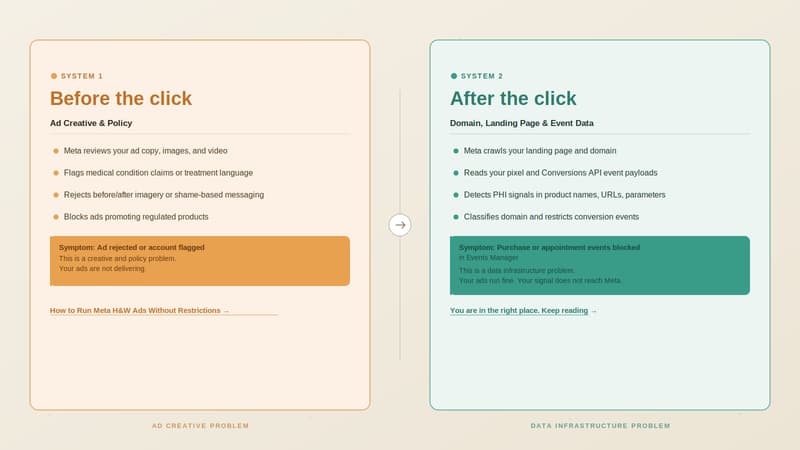
So, How Do You Keep Running Ads Without Violating Meta Health and Wellness policy?
Running a successful healthcare brand where your primary channel for driving acquisition is Meta boils down to a fundamental question: how can you enable someone to make a purchase or book an appointment without violating their privacy and without making Meta liable under HIPAA?
Stopping tracking entirely is not the answer. Without conversion signals, Meta's algorithm has no way to learn who your buyers are. Your CPAs rise, your ROAS drops, and you end up spending more to reach fewer of the right people.
The answer is a healthcare-compliant server-side architecture.
A healthcare-compliant setup does three things:
It controls what data reaches Meta. Your server intercepts every event before it reaches Meta and removes the signals that imply a health condition — product names like "Blood Sugar Control Kit," appointment types like "Oncology Consultation," or URL paths containing condition-specific terms. What Meta receives is a clean, neutral payload. It knows a conversion happened. It does not know what kind.
It controls where the data comes from. Meta classifies your domain based on what its crawlers find on your website. If your domain sells healthcare products or services, Meta classifies it as Health and Wellness and applies data restrictions. A compliant intermediary domain sits between your ads and your real website. Meta crawls the clean domain, finds nothing restricted, and applies no data restrictions to events coming from it.
It preserves your conversion signal. Despite removing PHI, the setup still sends Meta the data it needs to optimize, that a real conversion happened, from a real user, at a specific time. Meta's algorithm continues learning. Your Lookalike Audiences rebuild. Your ROAS recovers.
This is how healthcare brands continue running Meta ads without sending Protected Health Information to a platform that is not HIPAA compliant, and without losing the conversion signal that makes campaigns work.
Step 1: Find Out How Meta Is Categorizing Your Domain
Before you can fix blocked purchase or appointment events, you need to know exactly how Meta has classified your domain and what signals are triggering that classification. Meta's Events Manager tells you that a restriction exists — but it does not tell you why, or which specific elements of your domain caused it.
The Zappush audit tool simulates Meta's automated domain scan and breaks down your classification across four compliance pillars: Domain, Category, Product, and Text. Each pillar gets an individual score and a plain-English explanation of what was detected.
This matters for healthcare brands specifically because the classification trigger is often not obvious. It may be a product name implying a condition, a URL path containing a sensitive term, or a page description that Meta's systems read as health-adjacent. You cannot fix what you cannot see.
Run the Free Meta Restriction Audit → Paste your domain URL. No account or installation required.
Step 2: Check Which Events Are Blocked in Your Events Manager
Go to: Events Manager → Data Sources → Select your Pixel or Dataset → Settings
Under Settings, look at two sections: Data Restrictions and Manage Data Source Categories.
What You Are Looking For
Purchase events not matching your backend orders. This is the most common symptom at Level 2. Your Shopify, CRM, or backend shows 50 orders today. Events Manager shows 12 Purchase events. The gap is not a tracking error; it is Meta filtering events it has classified as PHI-containing payloads.
Appointment Scheduled events are absent or flagged. For healthcare brands running clinic, telehealth, or med spa campaigns, this is the equivalent of a blocked Purchase event. If your campaigns optimise for appointment bookings and Meta is not receiving those events, your algorithm is optimising for clicks from people who never book.
Events marked as unavailable for optimisation. Even when events appear to fire in Events Manager, they may be marked as restricted or unavailable for campaign optimisation. This is Level 2 in practice; the event arrives, but Meta strips it from the optimisation signal.
Core Setup locked ON. Under Data Restrictions, if Core Setup is enabled and cannot be turned off, your domain is under at least Level 1 restrictions. This means custom URL parameters and event metadata are being stripped before they reach Meta's systems, even if your events appear to fire normally.
Step 3: Fix It. Restore Your Purchase and Appointment Events
You now know your category and your restriction level. The fix has three components that work together. Each one addresses a different layer of the problem.
Why the Fixes You Have Already Tried Do Not Work
Before covering what does work, it is worth being direct about what does not, because most healthcare brands try at least one of these before reaching the architectural fix.
Renaming events: Changing 'Purchase' to 'OrderComplete' or 'AppointmentScheduled' to 'FormSubmit' - does not work because Meta evaluates the full semantic content of the payload, not just the event name. The product name, the appointment category, and the URL path - all of these are read and classified independently of what you call the event.
Switching to CAPI only and removing the browser pixel: This does not work anymore because the restriction is applied at the domain level, not the delivery method. Events sent server-side from a restricted domain are subject to exactly the same filtering. Meta's documentation confirms this explicitly, and Stape has verified it independently.
Appealing the category: Worth attempting if you believe the classification is genuinely incorrect, but it does not resolve the problem for brands that actually sell healthcare products or services. Appeals take 3 to 7 days, can only be resubmitted every 30 days if rejected, and a successful appeal does not change the underlying data architecture - meaning reclassification typically recurs.
Component 1: A clean intermediary domain
This is a separate domain that sits between your Meta ads and your actual website. When a user clicks your ad, they land here first. This domain contains no healthcare product names, no condition-adjacent language, no appointment category references — nothing that would cause Meta's crawler to classify it as restricted. Meta evaluates this domain, finds nothing restricted, and applies no data sharing rules to events that originate from it. This is not a subdomain of your main site. A subdomain inherits the classification of the root domain. It needs to be a separate, clean root domain with no restriction history.
Component 2: Server-side event routing with session stitching
When the user lands on the clean domain, your server captures their session data, _fbp, _fbc, UTM parameters, and click IDs. The user is then passed to your real website. Their journey is unchanged. What changes is that Meta's cookie and attribution data are anchored to the clean domain, not the restricted one. Your server then unifies the activity across both domains - the click on the clean domain, the purchase or appointment booking on your real site, and sends a single, consolidated event to Meta.
Component 3: Event payload cleansing
Before any event reaches Meta, your server processes it and removes or replaces the signals that triggered the PHI classification. Product names like "Diabetes Management Program" become neutral identifiers. Appointment types like "Oncology Consultation" are replaced with generic labels. URL paths containing condition-specific terms are stripped. What Meta receives is a clean payload. It knows a conversion happened, from a real user, at a specific time. It does not know the health condition implied by what they purchased or booked.
What this restores at each level:
What You Need to Fix This
If your purchase or appointment-scheduled events are blocked in Meta Events Manager, there are three things you need to put in place - not one, not two, all three.
A clean domain. A separate root domain with no restriction history that Meta's crawler evaluates and finds nothing restricted. Not a subdomain. A clean root domain.
A landing page on that domain. A compliant page that your ads point to - no healthcare product names, no condition-adjacent language, no appointment category references. This is the surface Meta scans when your ad is submitted and during active campaigns.
Server-side infrastructure. A server-side setup that captures session data on the clean domain, stitches it to activity on your real site, scrubs PHI signals from your event payloads, and forwards clean, compliant conversion events to Meta.
Without all three working together, the restriction resurfaces. A clean domain without server-side stitching loses attribution. Server-side infrastructure without a clean domain still sends events from a restricted source. All three are required.
At Zappush, we help Meta-restricted brands get unrestricted through a clean, compliant setup, domain, landing page, and server-side infrastructure, built end to end.