Summary / TL;DR
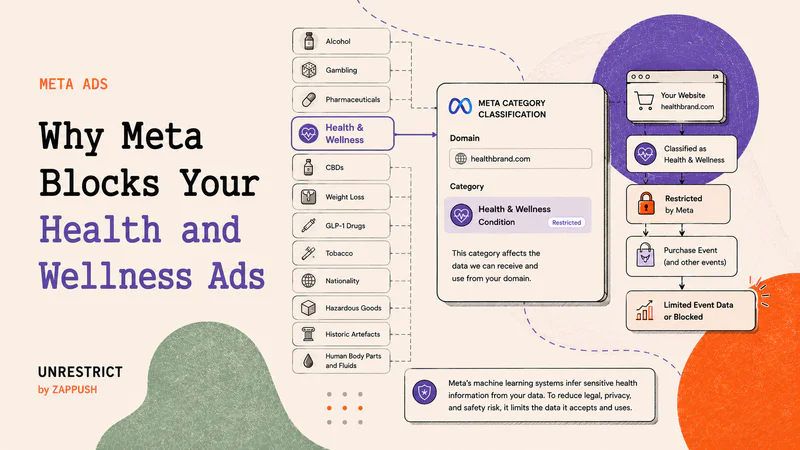
Meta scans your website the moment you add a destination URL to an ad.
Its automated systems crawl landing pages, read texts on your website and inside product images, analyze metadata, and infer product intent even before the ad is published.
If Meta infers your brand is selling products from restricted categories, such as Health & Wellness or CBD-related products, Meta puts restrictions as per the extent of the violation.
Meta assigns your domain to one of its 10 restricted categories.
If your site signals medical conditions, treatment claims, or regulated substances, classification tightens.
Once classified, Meta may:
Trim event metadata (Level 1 restrictions)
Block mid- and lower-funnel events like AddToCart or Purchase (Level 2 restrictions)
Restrict your entire domain’s data sharing (Level 3restrictions)
Early audits and measures, such as domain masking, prevent wasted energy and spending.
What Are Meta’s Restricted Categories and Why Do They Exist?
Meta groups certain businesses into Restricted Categories to reduce legal, safety, and regulatory risk, including privacy and data-sharing risks under laws such as HIPAA, GDPR, and similar frameworks, on its platforms.
There are 10 restricted categories in total. You don’t need to memorize them, but you do need to know they exist because Meta assigns one (or more) of these categories to your brand automatically. This assignment happens at the domain and data level, not just at the ad level.
At a high level, the restricted categories include:
Drugs and Pharmaceuticals
Health and Wellness
Tobacco and Related Products
Alcohol
Weapons, Ammunition, or Explosives
Online Gambling and Games
Endangered or Protected Species
Hazardous Goods and Materials
Historic Artefacts
Human Body Parts and Fluids
This classification is not just about ad approval. An ad can be approved while your domain is still classified under a restricted category.
Once Meta believes your brand belongs to a restricted category, it influences:
How much conversion data will Meta accept
Which events are filtered or blocked
Whether your domain or dataset is restricted at all
Whether Core Setup data restrictions are automatically enabled in Events Manager
This article focuses on two categories that most often impact legitimate e-commerce brands at the tracking and attribution layer:
Health & Wellness
Drugs and Pharmaceuticals (Cannabis and cannabis-derived products)
These categories are where Meta’s automated classification systems are most aggressive, and where restrictions commonly appear before advertisers see explicit ad rejections. In many cases, the first signal is not an ad rejection; it is degraded or blocked conversion data.
Why Does Meta Put These Policy Restrictions in Place?
Meta’s ad delivery system runs on machine learning.
It optimizes ads based on signals like:
Website visits
AddToCart events
Purchase events
On-platform engagement
The stronger and more specific the signal, the more precisely the system can optimize delivery.
Now consider this example.
A user purchases a product called 'Advanced Blood Sugar Control Kit'
If your Purchase event sends:
The product name
The product category
And an identifier such as email or phone
Meta’s system can infer that this person likely has a metabolic or diabetic condition.
From a machine learning perspective, that is a strong predictive signal.
In practice, signals like this can influence ad delivery. The person may begin seeing ads related to metabolic health, blood sugar support, or similar condition-adjacent products because the system has detected affinity.
From a privacy and regulatory perspective, that is sensitive health information tied to an identifiable individual.
This creates HIPAA risk when applicable, and violates Meta’s advertising data policies regardless. That's why it's important to know how to run Meta Ads for sensetive category.
Health conditions are legally sensitive in many jurisdictions. Even when HIPAA does not directly apply, Meta explicitly prohibits advertisers from sending sensitive health information in event payloads.
So these restrictions are not arbitrary.
They exist because:
Health data is highly sensitive
Deterministic inference increases liability
Machine learning systems act on signals automatically
Platforms must reduce the risk tied to optimization in sensitive categories
In simple terms:
Meta limits health-related tracking because its machine learning systems are designed to act on signals, and some signals are too sensitive to optimize against.
How Meta Classifies Brands (Not Just Ads)
Meta does not classify risk in one place. It infers brand category across three independent surfaces, and enforcement is cumulative.
These surfaces are evaluated separately, but the enforcement stacks. An approved ad does not protect a risky landing page. A clean landing page does not override sensitive event payloads.
If any one surface signals that you are selling restricted product categories from Health & Wellness or Drugs and Pharmaceuticals, Meta applies restrictions downstream.
The three surfaces Meta evaluates are:
Ads (creative and copy)
Landing pages and website content
Event payloads (Pixel or Conversions API)
Let's evaluate each one of these one by one.
1. Ads: Why MetaRejects Health & Wellness Ads
At the ad surface, enforcement is visible and immediate.
Meta reviews your ad copy, images, and videos for policy risk. In the Health & Wellness and Drugs & Pharmaceuticals categories, enforcement is aggressive.
Common rejection triggers include:
Medical or treatment-style claims
Before/after or transformation implications
Language that implies personal attributes or diagnoses
Imagery that highlights “problem areas” or consumption
For example:
Struggling with diabetes? Fix it now.
Finally, eliminate your PCOS symptoms.
A side-by-side fat-loss transformation.
A creative showing someone consuming THC gummies.
Meta is especially strict about personal health before-and-after images. Even if the product is legitimate, side-by-side transformations that imply weight loss, skin correction, hormonal recovery, or medical improvement are often rejected. If the creative suggests diagnosis, treatment, or negative self-perception, it is likely to violate Meta’s Health & Wellness ad policy.
Ads that violate policy are rejected and do not deliver.
While ad rejection is frustrating, it is the least damaging form of enforcement because it is explicit and reversible. That said, repeated rejections and policy violations can escalate to broader account restrictions or disablement.
Important distinction:
Ad rejection is not the same as domain classification. An ad can be compliant while your domain is still flagged at the data level.
2. Landing Pages and Website: Where Domain Restrictions Begin
The most important factor in deciding the product and the category that you sell is your landing page and the domain on which the e-commerce conversion happens.
Meta evaluates the destination URL and landing experience the moment you add a URL in Ads Manager.
Meta’s systems analyze:
Visible landing page copy
Text inside images (labels, packaging, screenshots)
Page titles, meta descriptions, and markup
Overall site context reachable from the landing page
It does not wait for conversions. It classifies first.
If Meta detects sensitive health terms, drug-related language, or restricted imagery, enforcement shifts from ad rejection to domain and data-level restriction.
Even if these are legitimate products, they signal regulated medical or substance intent.
For example:
A skincare brand promoting a Severe dermatitis correction formula.
A supplement page claiming to support blood sugar balance for metabolic health.
An e-commerce brand selling weight-loss supplements
A CBD store selling THC-infused gummies.
Once Meta infers that your domain sells restricted product categories from Health & Wellness (such as weight-loss supplements) or Drugs and Pharmaceuticals (such as cannabis-derived THC drinks or gummies), Meta may enable core restrictions and place your domain at one of the following restriction levels.
Core Setup Can Turn On Without Any Ad Rejection
One common misconception is that you will always see ad disapprovals before restrictions begin.
That is not how this typically works.
In many cases, your ads continue to run and get approved, while Meta quietly enables Core Setup data restrictions at the domain level.
For example:
You run ads for a “Clinically Tested Redness Relief Face Wash.”
The ad is approved.
Traffic flows normally.
Sales are coming in.
But inside Events Manager:
Core Setup is automatically enabled.
URL parameters are trimmed.
Product-level metadata stops passing through.
Purchase events begin losing detail.
From the outside, nothing looks broken.
Events still fire. Purchases are recorded.
But when Core Setup is enabled:
URL-based audience rules stop working because everything after the domain is removed.
Custom parameters are stripped, so audiences built on product attributes or condition tags stop updating.
Automatic advanced matching may be unavailable.
Pixel-based catalog updates may no longer function.
The restriction does not stop delivery.
It limits segmentation and audience precision.
Over time, this reduces the advertiser’s ability to build granular funnels and high-intent audiences.
Ad approval does not mean your domain is unrestricted.
Core Setup changes how much usable segmentation data is available inside Meta.
How domainrestrictions typically escalate
In practice, brands experience restrictions in the following progression:
Level 0: Domain permanently flagged
The domain carries long-term restricted classification. Even compliant ads inherit the risk.Level 1: Core Setup restrictions enabled
Meta limits URL data and blocks event metadata and parameters. Events still fire, but signals degrade.Level 2: Purchase events blocked
Lower-funnel events stop matching or become unusable for optimization.Level 3: All events blocked
Even basic events like PageView may stop contributing to optimization. Ads run blind.
This is why you should audit your landing page URL with the Health & Wellness Audit Tool. It shows how Meta currently classifies your domain and highlights restriction signals visible inside Events Manager before performance collapses.
3. Event Payloads: How Tracking Data Triggers Restrictions
Even with clean ads and compliant landing pages, Meta can still restrict you based on what you send in events.
Every Pixel or CAPI event is semantically analyzed. Meta looks at:
Event names
Product titles and item categories
Content IDs and URL paths
Parameters attached to conversions
This analysis is not limited to product keywords. Meta’s systems evaluate the overall meaning of the event payload, including how product names, URLs, and parameters relate to one another. It is inference-based, not just keyword-based.
Risk increases when event payloads imply:
A medical condition or diagnosis
A treatment or health outcome
A regulated or ingestible substance
Examples include product names or categories like:
“PCOS Support”
“Diabetes Control”
“ED Booster”
“THC Gummies”
It’s not limited to supplement or CBD brands.
For example, a legal intake form asking, “Were you diagnosed with lung disease after workplace exposure?” can trigger similar classification signals.
What matters is whether the event implies a sensitive condition tied to an identifiable user.
In many cases, restrictions begin with lower-funnel events. You may notice Purchase or InitiateCheckout events disappearing or being marked as restricted, sometimes only in specific regions such as the EU, where enforcement is stricter.
Meta explicitly prohibits sending sensitive health information in event data. Mixing condition-implying product metadata with user identifiers (email, phone, etc.) increases both Meta policy risk and potential regulatory exposure, depending on your business and jurisdiction.
This is why many Health & Wellness and CBD brands see Purchase events blocked even when ads are approved.
How to Check If Meta Has Flagged Your Domain
You don’t have to guess whether Meta has classified your brand under a restricted category. The signals are visible if you know where to look.
Step 1: Check Data Source Categories
Go to:
Events Manager → Select your Pixel or Dataset → Settings → Manage Data Source Categories
This is where Meta shows how your domain is classified.
You may see labels such as:
Health & Wellness
Drugs & Pharmaceuticals
Financial Services
Other Restricted Categories
If your domain appears under one of these, Meta has already assigned a category based on its analysis of your landing page and event data.
You may also see an option to request a review. This does not guarantee reversal, but it confirms that classification has occurred.
Step 2: Check if Core Setup Restrictions Are Enabled
Still inside Events Manager, review whether Core Setup restrictions are turned on.
When Core Setup is enabled:
URL parameters may be trimmed
Certain event metadata is removed
Custom parameters may not pass through
Your events will still appear to fire. But the signal quality is degraded. This is where performance begins to weaken quietly.
Step 3: Check for Event Blocking
Next, review your event activity.
Look for:
Purchase events not matching backend sales
AddToCart or InitiateCheckout events are missing
Events marked as restricted or unavailable for optimization
In some cases, enforcement is geography-specific. For example, restrictions may apply more aggressively to EU traffic.
Why EU Traffic Gets Restricted First
In many cases, restrictions apply more aggressively to traffic from the European Union.
This is because EU privacy regulations treat health-related data as a special category of sensitive information. As a result, Meta may:
Enable Core Setup restrictions automatically for EU users
Trim URL parameters more aggressively
Block mid- and lower-funnel events sooner
You may notice that Purchase events work for US traffic but appear restricted or degraded for EU traffic.
This does not always mean your domain is fully blocked. It often means enforcement is geography-specific.
If your performance issues are concentrated in EU campaigns, check this first.
If lower-funnel events are blocked, optimization will struggle. Meta’s algorithm cannot optimize on signals it does not receive.
What This Means
If you see any of the following:
Your domain is categorized under a restricted group
Core Setup automatically enabled
Lower-funnel events are restricted or blocked
Classification has already happened.
At that point, the issue is no longer ad copy. Understanding this early prevents weeks of creative testing on a setup that cannot scale.
What Is the Solution?
If your domain is classified under Health & Wellness or Drugs & Pharmaceuticals and the Events Manager shows restrictions, the solution is architectural: Domain Masking combined with Server-Side infrastructure.
Domain masking creates a compliant entry layer so Meta evaluates a clean marketing domain, while server-side architecture gives you control over what event data is transmitted, ensuring only compliant parameters reach Meta.
Without this setup, scaling becomes unstable as classification pressure and data restrictions continue to resurface.